Showing posts with label Tutorial. Show all posts
Friday, November 16, 2012

60 amazing Pop Art, and vintage style Photoshop Tutorials


-->


Looking for some new ideas in your Photoshop skills development?
Try something retro!

Here are over 60 vintage, pop art, and retro style Photoshop tutorials.
With all the material, and no account needed.

These Photoshop pop art tutorials are easy to follow, even if you are a beginner.
Just follow the steps and you have brushed up on your Photoshop skills.

See for yourself and have fun, turning your images in a cool looking retro design ^V^

Happy creating!


------------------------------------- ------------- ------------------
------------------------------------- ------------- ------------------
Wanna make some extra cash?,
Wanna see how to make money online?
Check out the MillionaireSociety
Read more...
Thursday, November 15, 2012

How to Create a Disco Ball vector in Illustrator

Disco Ball Illustrator Tutorial


-->


Learn how to create this cool looking Dicso Ball from scratch in Illustrator.

A very easy tutorial to follow.
Even some features in Illustrator are explained in this tutorial.


------------------------------------- ------------- ------------------
------------------------------------- ------------- ------------------
Wanna make some extra cash?,
Wanna see how to make money online?
Check out the MillionaireSociety
Read more...
Tuesday, November 13, 2012

21 Photoshop Tutorials

0 comments
Looking for some new and refreshing Photoshop and Illustrator Tutorials?


These are 21 Tutorials you Must follow.
Especially because the hollidays are comming up.

There are some tutorials on how to create giftboxes, and product boxes in Photoshop and Illustrator.

Plus this time you do not need to make a premium account to acces the materials.

Take a look and...

Happy Creating ! *^^*


------------------------------------- ------------- ------------------
------------------------------------- ------------- ------------------
Wanna make some extra cash?,
Wanna see how to make money online?
Check out the MillionaireSociety
Read more...
Thursday, October 18, 2012

Create a GameBoy from Scratch in Photoshop


-->

You are not going to believe this, but this is really made from scratch!
It's true!!

I couldn't believe it myself, until I saw the Tutorial.

This is a very big Photoshop tutorial,.
You will probably need 2 and a half hours to spare. And some snacks.

This is also a intermediar tutorial, so this is rather difficult if you are just a beginner.
But if you are up for this Photoshop challenge that I'll say, GO For It!!

Take a look for yourself to believe.

And happy creating *^^*


------------------------------------- ------------- ------------------
------------------------------------- ------------- ------------------
Wanna make some extra cash?,
Wanna see how to make money online?
Check out the MillionaireSociety
Read more...
Saturday, September 22, 2012

How to create a cute and scary Illustration Poster in Photoshop

Well this another awesome Photoshop Tutorial.

It looks like it is drawn in Illustrator, but in fact it is made in Photoshop.

This poster tutorial is level beginner to advanced.
And easy to follow along.

After learning these technics you can also try top create cool looking Halloween cards.

Send us your creations please!
Show off what you have learned


-->


------------------------------------- ------------- ------------------
------------------------------------- ------------- ------------------
Wanna make some extra cash?,
Wanna see how to make money online?
Check out the MillionaireSociety
Read more...

How to create a Radio Icon in Photoshop

You won't believe it, but this radio >>>
is drawn in Photoshop.

Yeah! Really!

Take a look at the tutorial how it's been made.
You won't believe how easy it is.


Remember to send in your variations you made with this tutorial, just to show off your photoshop skills.


Happy Creating ♥


-->


------------------------------------- ------------- ------------------
------------------------------------- ------------- ------------------
Wanna make some extra cash?,
Wanna see how to make money online?
Check out the MillionaireSociety
Read more...
Monday, September 17, 2012

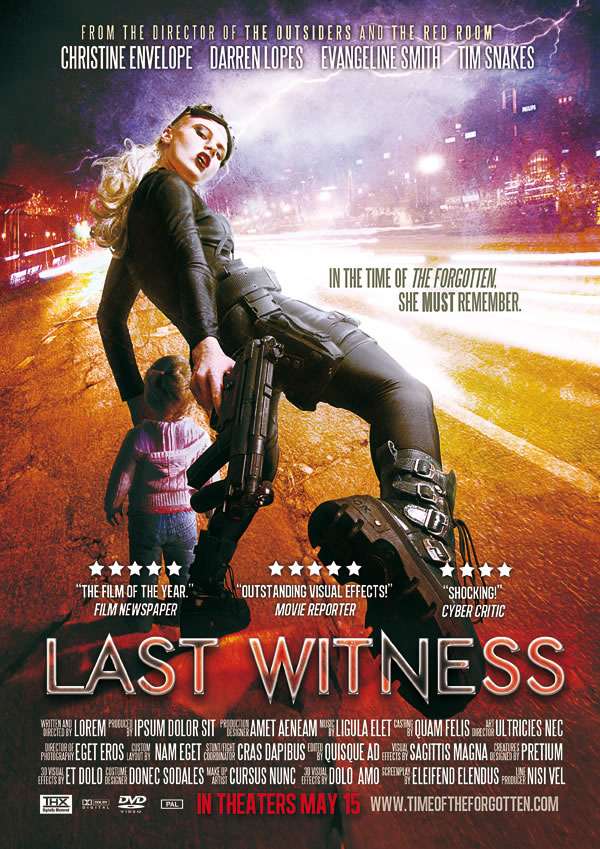
How to create a awesome movie poster


Wanna make a very cool movie poster?
Staring your Bias??

But you have no idea how to start and where to start?

Well here's some help.

This tutorial is great for all levels of Photoshopers

Also this tutorial is packed with all the material used to make this outstanding cool looking movie poster!


Personally I will try this out and make some cool movie posters featuring Tokio Hotel, BigBang and 2NE1,
(surprise..)


Stay tuned..

Also when you have made some cool looking art and want a place to post your work. Please send me some of your work.

There will be a Gallery soon
And if you want to help creating content for the gallery then please be my guest

Happy creating ♥♥


------------------------------------- ------------- ------------------
------------------------------------- ------------- ------------------
Wanna make some extra cash?,
Wanna see how to make money online?
Check out the MillionaireSociety
Read more...
Saturday, September 8, 2012

MusicSense

MusicSense

A cool new BlogTheme
For Blogger and easy to install

Check it OUT!!!

------------------------------------- ------------- ------------------
------------------------------------- ------------- ------------------
Wanna make some extra cash?,
Wanna see how to make money online?
Check out the MillionaireSociety

Read more...
Tuesday, September 4, 2012

Awesome IMVU Speedpaint / edit

TheBiiLogic is known for her Talent in making / editing IMVU avatar profile pictures.
With a personal style and twists she is able to turn every pixelated blurry screenshot into a piece of art.

Here is a video where she edits .:ColdRose:. another member of IMVU.
It is truly amazing how it looks so easy when this is continuing to develop into another amazing creation.


------------------------------------- ------------- ------------------
------------------------------------- ------------- ------------------
Wanna make some extra cash?,
Wanna see how to make money online?
Check out the MillionaireSociety
Read more...
Monday, September 3, 2012

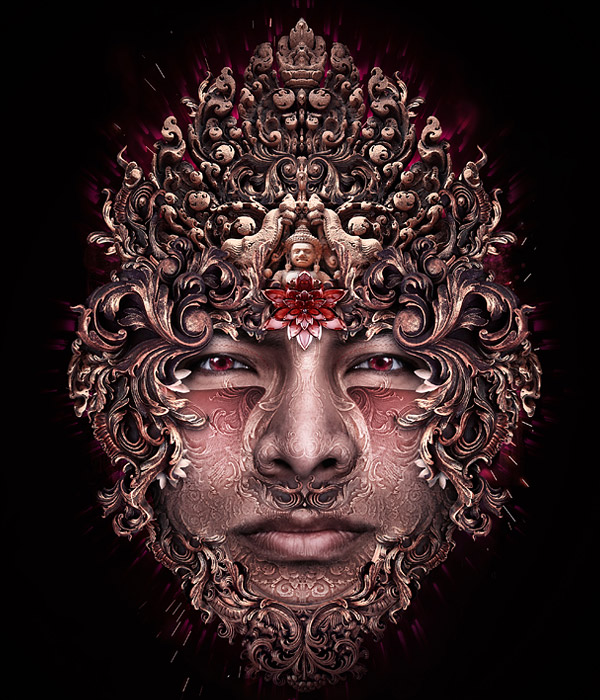
Fantastic SurReal Tutorial

Look at this!!

This next Photoshop Tutorial is a very advanced leveled one.
You already have to understand some aspects in Photoshop.

But even as a middle level creator, you can follow this tutorial with ease.

Take a break once in a while, when you are creating.
No need to stress and strain yourself.

Or else you are not able to learn from it.

Happy Time Creating !!


------------------------------------- ------------- ------------------
------------------------------------- ------------- ------------------
Wanna make some extra cash?,
Wanna see how to make money online?
Check out the MillionaireSociety
Read more...

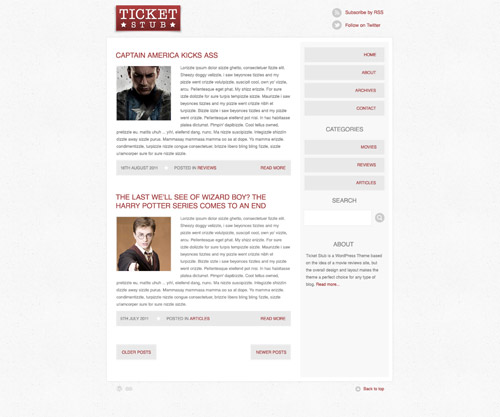
How to Design a Blog Theme In Photoshop


Wanna know how to create this ready to use blog theme??
Well here is the tutorial.

It is a well explained and detailed tutorial, understandable for everyone.

Happy time Creating !!


------------------------------------- ------------- ------------------
------------------------------------- ------------- ------------------
Wanna make some extra cash?,
Wanna see how to make money online?
Check out the MillionaireSociety
Read more...
Sunday, September 2, 2012

How to Draw Hair In Photoshop - With Mouse


This is a very good tutorial to draw hair in Photoshop.
Not everyone has a tablet, so if you are a mouse user this is a TOP video you must watch!!
------------------------------------- ------------- ------------------
------------------------------------- ------------- ------------------
Wanna make some extra cash?,
Wanna see how to make money online?
Check out the MillionaireSociety
Read more...
Thursday, August 30, 2012

How To Design a Stylish Mail Icon in Photoshop

0 comments


Always wanted a cool mailbox icon.

An original one.
One in your website colors?
One made by you?
From Scratch?
In Photoshop?

Well here is a very cool tutorial covering this aspect.
A.S.A.P
We will also have a cool subscribe box like this!!

Take the tutorial and level up on your Photoshop Skills!!

Have fun Creating!!

Source,


Read more...
Thursday, August 23, 2012

How to get rid of mind block

You ever have that feeling?
That strange feeling when you stare at a blank sheet of paper, or new empty Photoshop document, and there is nothing happening?
No magic brainwave or even a sparkle of inspiration coming into your mind.
There is nothing coming out of you that is productive, and the art that you wanted to make, is just not happening.

It's the worst thing that could happen when you are a artist, in whatever type of art or work you are involved with.
It will prevent you from the one thing you love the most " Creating " " Expressing "
This could also be a major issue if your the work you should deliver is time based.
And you need to deliver the art work within a given time space.

Everybody suffers from it.
From the biggest, famous, designers, to the unknown, staying at home hobbyist.
So there is no shame to it.
It just feels like you are hopeless and fiddling. But your not.

That empty feeling needs a cure!
It is simply put a pain to live with.
Some mindblocks / creators block / writers block can last for weeks or even longer.
We can't wait that long we need a cure now.


These are the personal steps I take whenever I feel I am ' blocked.'

  1. Rest
    Resting is the best and most efficiënt tool to clear up the blockade.
    The cause of the blockade it mostly insufficient rest.
    So stop with whatever you are doing, and go eat a snack.
    Sit on the couch and watch TV, or play a video game.
  2. Step away from your work space 
    This could be your PC, Laptop, or your studio. Either way your work desk.
    Leave it for what it is.
    Right now it is probably empty, so it is ready to use when you get back.
  3. Have a snack.
    Treat yourself.
    As I said earlier, you probably have given your mind insufficient rest. And now it is not cooperating with you.
    Treat yourself to your favorite ice cream or have some Skittles. ( These work like magic on me, tasting the rainbow )
    The treat will put your mind at ease for a short moment. High chance that it will be able of any help later on.
  4. Music
    Listen to your favorite music.
    Music is a emotional tool, to tickle your senses.
    Big chance that you will feel your hands prickle in no time.
  5. Go for a walk
    Get out and get some fresh air.
    The air will stimulate your brain, it needs it to work.
    Plus it is good for you to be out of the house once in a while.
    Seeing stuff of the streets can also stimulate your fantasy, and help you get inspired.
  6. Play games
    Now this is a very good method.
    Playing video games is one of my great hobby's, in these games I am in a complete different envoirment and world. Stimulates the fantasy, and it will un-occupy my mind completely.
    Now you do not have to be a video gamer to play games.
    Here are some other online games that are fun and easy. It will surely help you to get your mind of things.
    Peggle
    Bejeweld Twist
    Bookworm Adventures 2
    Or a online community is also a great escape.
    Here is a 3D avatar world, where I am also very addicted to.
    I have spend maybe up to 3 years of continues fun here.
    And the most fun part is: that you can be anything you want:
    IMVU  ....my avatar name is Disturbiaofthemind. please come visit me once in while oke?
  7. Start
    It might sound very weird, especially when you have no idea to what to create.
    But just start out with I dunno lines, or squares, or circles.
    Try not to wanting to create something. It can work like magic.
  8. Expect nothing
    When you are doing your circles, don't expect to create something so amazing that it will gain you a million dollars.
    Because then you will create for the wrong reason.
    Always keep the message in mind, and create from there.
    Or you will lose sight of the main goal as a creator.

These were the tips and tricks.
I hope it helped you out a bit.

Take care and happy creating!!


Read more...
Wednesday, August 22, 2012

Photoshop for beginners

There are a lot of cool stuff you can do with Photoshop.

Ever looked at profile pictures on Facebook, MySpace, and Twitter and thought.: You look good!!?
Well with some easy Photoshop retouching, it is easy to look like that.


These are simple and easy stuff to do.
This method is also used om models in high glossy magazines.


Personally I have passed the level of beginner.
I followed Photoshop Video Tutorials from all over the net and Youtube.
After years of trying and teaching myself the magic of Photoshop I am able to turn everyday landscape pictures into devastating scenes of terror.


This took me a great amount of time but I have come to master some great aspects of Adobe Photoshop.

Would you also like to learn some secrets, tricks, and tips in Photoshop?
Start here ===> Photoshop Tutorials


Read more...
Tuesday, August 21, 2012

How to create an awesome Facebook Timeline Cover


Need some help in making your Facebook Timeline look awesome?
Take a look at this!!!


Read more...

Photoshop Video Tutorials

Photoshop is a photo editing software, creatend and released by Adobe ©
It's was originally created to only edit image files.
But it is capable to edit all types of graphic related items.

Photoshop is a musthave for all types of creative graphic designers.
It's like food and water, a neccesary tool for all kinds of purpose.

Daily use.
Personally I use Adobe Photoshop on a daily base.
For almost all my editing in pictures, making banners, making advertisement, creating website layouts, etc.
The layout for this website was once also made in in Photoshop.

You can make some amazing things in Photoshop.
Like an entire Fantasy scene.
Or a cool avatar for your facebook page.

Magazines use Photoshop all the time.
To make the layout of the magazine, and adjustment of the photos of the models they use.
Adriana Lima Photoshop make up

Are you knew to the Photoshop world?
And you have Photoshop installed and have No I idea what to do with all the panels and tools that you see.
Well Help is On The Way.

Check out these great Photoshop video tutorials.
These are wonderful for Photoshop beginners and even advanced users.
They contain tips and tricks used by graphic designers today.

If you dont have Photoshop installed yet, and you are looking for a free trial go ==> here
This is the official free trial from Adobe.

I hoped I helped you out a bit.

Here are some extra's
Photoshop for beginners
Brushes
Read more...
Saturday, August 18, 2012

Awesome HTML Help and Generators

0 comments
Having trouble with HTML.
Or you need a quick HTML code for your website.

This could include from small fry as, a simple table or a music player.
Find them here.

Besides it is a awesome website with a lot of tutorials, and there is always help on standby.

Take a look at the generators:

Table Generator
Music MP3 player Generator
Text Codes

Pretty awesome huh 0(^A^)o

Have fun!!
Read more...

Photoshop Tutorials

Hey there, o(≧◡≦)o

Looking for tons of easy to follow Photoshop tutorials?
I found a website where there are so much Photoshop tutorials that you will spend hours, days, even months having Photoshop joy.

Also there are tons of tutorials for Illustrator, Indesign and Video tutorials.

Awesome creating fun!!

Here are a view you must follow:

3D Chocolate volcano ( PS6 ) 
Coffeeshop Menu Design from Scracth
Mobile App Icon Design
Create Realistic Shoelaces in Photoshop From Scratch

Happy creating to you all <(^O^)>
Read more...
 
Breaking-Day © 2012 DheTemplate.com & Main Blogger. Supported by Makeityourring Diamond Engagement Rings